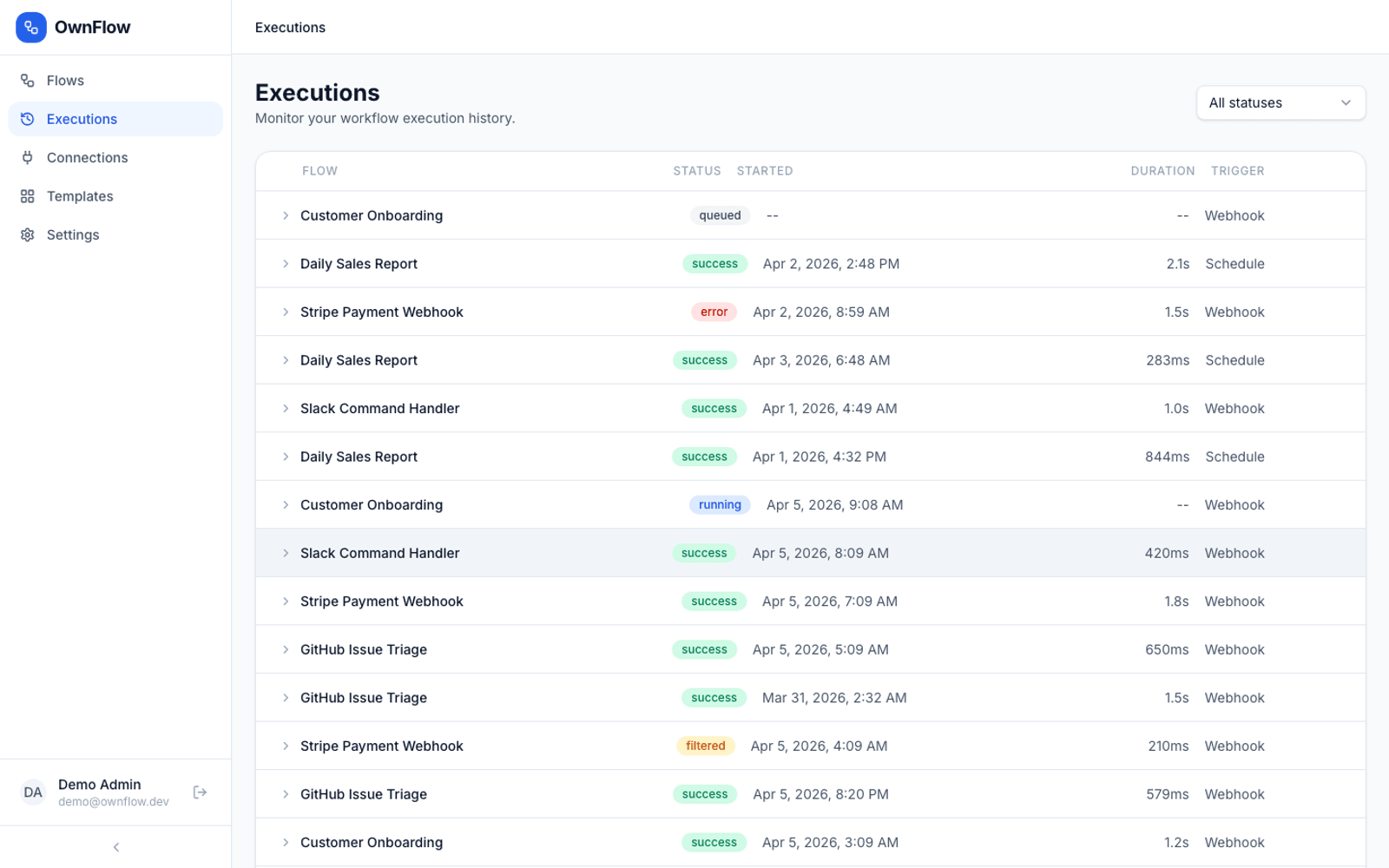
Fig 1 — OwnFlow replaces Zapier, Make.com, n8n and runs natively on the Own360 control plane.
Why OwnFlow exists
Every enterprise spends a non-trivial slice of its software budget on the engineering layer — yet most of that spend goes to vendors that hold the data, throttle the integrations, and charge per seat for features that should be commoditised. OwnFlow exists to absorb that layer into something the enterprise owns end-to-end.
OwnFlow gives engineering teams a visual way to connect applications, route data between services, and run multi-step integration pipelines on infrastructure they control. Thirteen node types cover triggers, transforms, routing, error recovery, and human-in-the-loop approval; step-level traces expose per-node input and output for debugging; and because it is self-hosted, runs are unlimited — there is no per-task meter that scales with your success.
Automate. Integrate. Orchestrate. Self-Hosted.
What it replaces
Most teams reach OwnFlow after running into the limits of the legacy stack:
- Zapier — per-task pricing that grows linearly with usage disappears: OwnFlow is self-hosted with unlimited runs, so the cost curve no longer scales with your success.
- Make.com — preserved as a familiar reference point but no longer required for the workflow.
- n8n — the visual DAG builder, 13 node types, and step-level execution traces cover the same ground, governed by the shared Own360 control plane rather than a separate deployment.
The replacement isn't a feature-for-feature clone. OwnFlow keeps the workflows you actually use, drops the ones that exist only because the underlying database was relational and the vendor wanted another SKU, and adds the things the SaaS world refuses to give you: identity sharing with every other application, a unified audit trail, and an event stream other Own360 apps can subscribe to.
Capabilities at a glance
Fig 2 — Core capability surface. Every feature publishes events to the Own360 bus and is governed by the shared control plane.
Highlights
- 13 node types: triggers, transforms, routing, error recovery, human-in-the-loop
- Unlimited runs — no per-task pricing that scales with your success
- Step-level execution traces with per-node input/output for debugging
Feature surface
- 13 Node Types. Triggers, transforms, routing, error recovery, conditional branching, parallel execution, and human-in-the-loop approval.
- Visual DAG Builder. Flow editor canvas with webhook triggers, conditional routing, and drag-and-drop node composition.
- Step-level Traces. Per-node input/output payloads for debugging with complete execution history and error messages.
- API-first. REST endpoints for flows, executions, connections, and webhooks. No per-task fees — unlimited runs.
The numbers that matter
Who uses OwnFlow
Fig 3 — OwnFlow delivers role-specific outcomes from a single shared workspace.
Platform Engineer. Visual DAG builder with webhook triggers, conditional routing, and parallel execution — no YAML pipeline debugging.
Integration Lead. Connect any application via REST. Error recovery, retries, and dead-letter queues built into the flow.
IT Director. Self-hosted with unlimited runs. Replace Zapier's per-task pricing that grows linearly with usage.
How OwnFlow fits the Own360 stack
OwnFlow is one of 23+ Own360 applications that share a single control plane. The same identity provider, the same role-based access engine, the same audit log, the same event bus, and the same workflow runtime power every app on the platform.
That sharing is not cosmetic. It is what makes the platform a coherent operating layer rather than a federated bag of SaaS tools. A permission grant in OwnCentral instantly affects OwnFlow. An event emitted by OwnFlow can trigger a workflow in OwnFlow. An audit record from OwnFlow surfaces in the same query as one from OwnERP. There is no integration project — only configuration.
Operational economics
The Own360 commercial model is deliberately simple and decidedly not per-seat. Every Own app — including OwnFlow — is source-available, self-hostable, and licensed perpetually. The 10-year cost curve flattens because there is no annual seat inflation, no AI add-on SKU, and no vendor lock-in tax on the data you produce.
For finance leaders, this turns an OpEx subscription stream into a one-time CapEx outlay plus a small support footprint. For engineering leaders, it turns a vendor integration roadmap into an internal product roadmap. For security leaders, it eliminates the "data lives at someone else's URL" risk entirely.
Frequently asked questions
What is OwnFlow?
OwnFlow is the Own360 product for "Automate. Integrate. Orchestrate. Self-Hosted." in the Engineering layer. It is a self-hosted automation platform where engineering teams visually compose flows that link applications, move data between services, and orchestrate multi-step integration pipelines — with unlimited runs and no per-task fees.
What does OwnFlow replace?
OwnFlow is designed to replace Zapier, Make.com, n8n with a single owned, governed surface that runs on the Own360 control plane.
Who uses OwnFlow?
Platform Engineer: Visual DAG builder with webhook triggers, conditional routing, and parallel execution — no YAML pipeline debugging. Integration Lead: Connect any application via REST. Error recovery, retries, and dead-letter queues built into the flow. IT Director: Self-hosted with unlimited runs. Replace Zapier's per-task pricing that grows linearly with usage.
How does OwnFlow fit into the Own360 stack?
OwnFlow runs on top of the Own360 control plane — sharing identity, permissions, audit, and workflow services with every other Own product. There is no separate SSO setup, separate audit log, or separate integration layer. The same governance and event bus apply.
Is OwnFlow self-hosted?
Yes. The entire Own360 platform — including OwnFlow — is designed to run inside your VPC, your on-prem data centre, or a sovereign cloud. Source-available with perpetual licensing; no per-seat tax, no data egress, no telemetry leaving your boundary.
Related products in the Engineering layer
- OwnData — Federate. Govern. Stream. Serve.
- OwnBI — Visibility. Analytics. Insights. Decisions.
- OwnETL — Extract. Transform. Load. Monitor. Govern.
- OwnVault — Centralize. Encrypt. Share. Recover.
See it live
OwnFlow is part of the Own360 platform demo. Get in touch for a walkthrough, or browse the rest of the product stack to see how the layers compose.